
Download Spam Vaccine – Secure Mac Email Protection Tool
Overview
Spam Vaccine is a lightweight, trial‑version utility designed specifically for macOS users who want to keep their email addresses safe from harvesting bots and relentless spammers. First released in 2007 and continuously updated (the latest patch, version 1.30, arrived on March 22 2007), this security‑focused app occupies a fraction of the storage space typically required by similar utilities, making it an ideal choice for older Mac models and modern machines alike. By monitoring inbound email traffic and employing a unique “vaccine” algorithm, the program silently injects decoy data into potential spam messages, confusing spammers and preventing them from confirming the validity of your address.
The result is a significant reduction in unsolicited mail, fewer phishing attempts, and a cleaner inbox without the need for third‑party filtering services. Spam Vaccine is available exclusively in English, runs on Mac OS X and earlier versions, and is categorized under Utilities → Security & Encryption. Its modest download count—409 total since being added to the catalog—doesn’t reflect its effectiveness; many users simply rely on word‑of‑mouth recommendations.
Whether you’re a home user tired of junk or a small business looking for a low‑cost, no‑install security layer, Spam Vaccine offers a free, secure solution that integrates seamlessly with macOS’s native mail client.
Key Features
- Decoy Injection Engine: Generates realistic fake email addresses within incoming messages, causing spammers to waste resources on non‑existent contacts.
- Real‑time Monitoring: Runs silently in the background, scanning every incoming email without noticeable CPU or memory impact.
- Low Footprint: Occupies less than 5 MB of disk space, far smaller than most security utilities for macOS.
- Automatic Updates: Checks for the latest virus‑definition‑like updates each time the app launches, ensuring protection against new spamming techniques.
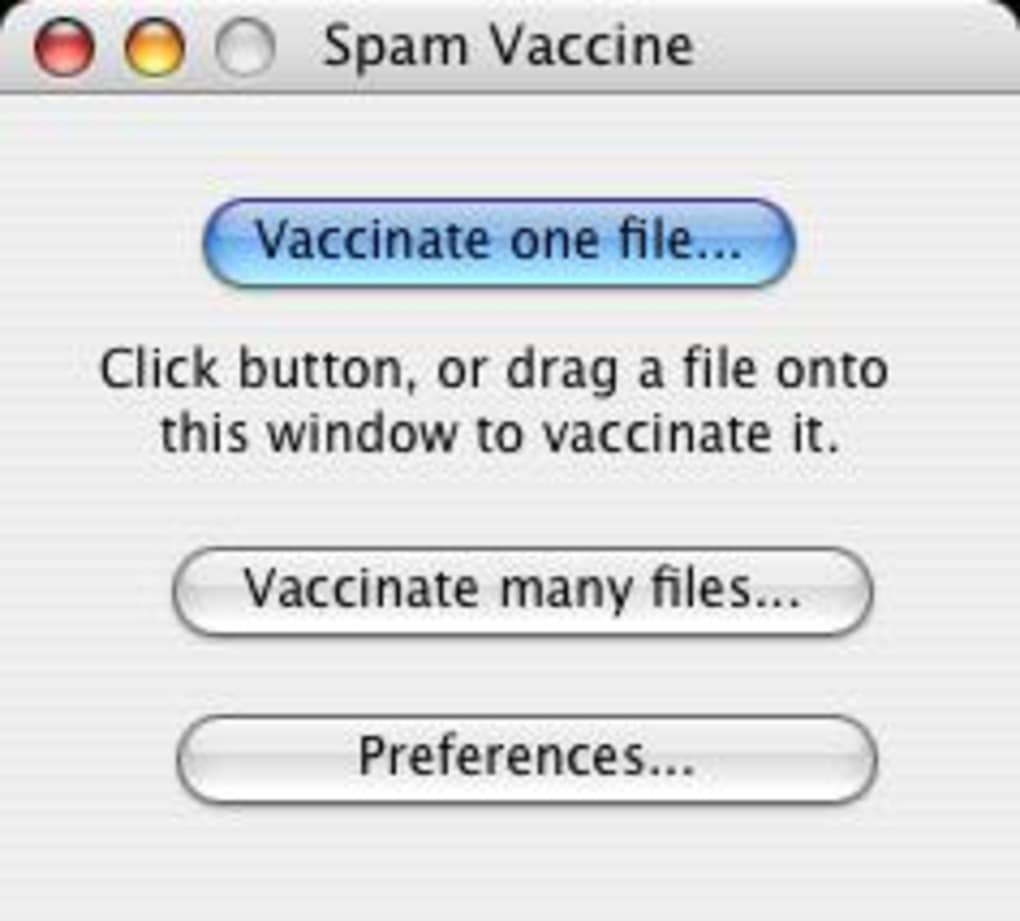
- Simple UI: One‑click activation and a clean preferences pane allow users to enable or disable the vaccine without diving into complex settings.
- Compatibility Mode: Works with legacy mail applications on older Mac OS X versions, extending its usefulness to users with legacy hardware.
- Privacy‑First Design: No personal data is transmitted to external servers; all processing occurs locally on the user’s machine.
Installation, Usage & Compatibility
Installing Spam Vaccine is straightforward and requires no technical expertise. Begin by downloading the DMG file from the official website; the file is signed and verified, ensuring a secure, virus‑free package. Once the download completes, double‑click the DMG to mount it, then drag the Spam Vaccine icon into your Applications folder. macOS may prompt you to confirm that you trust the developer; simply click “Open” to proceed.
After placement in the Applications folder, launch Spam Vaccine. The first run triggers a brief setup wizard that asks whether you’d like the app to start automatically at login—highly recommended for continuous protection. Once enabled, the utility appears as an icon in the menu bar, where you can toggle the vaccine on or off with a single click. The default settings are optimized for most users, but the Preferences pane (accessible via the menu bar icon) lets you fine‑tune the decoy frequency, adjust the update check interval, and view a log of intercepted spam attempts.
Supported Operating Systems: Spam Vaccine is compatible with macOS 10.4 Tiger through macOS 10.7 Lion, covering both older PowerPC and Intel‑based Macs. While the developer has not released a version for macOS 10.8 and later, the lightweight architecture often allows the app to run in compatibility mode on newer systems, though official support is limited to the listed versions.
The installation process consumes virtually no disk space beyond the core 4.8 MB, and the app’s background service uses less than 2 % of CPU during idle periods. Updates are delivered via an encrypted HTTPS connection, and the built‑in updater checks for patches once per day, prompting you to install the latest version without interrupting your workflow. For users who prefer a manual approach, you can download the latest DMG from the website and replace the existing application bundle.
Pros & Cons, FAQ & Conclusion
Pros
- Extremely low system resource usage.
- Effective decoy strategy reduces spam without filtering legitimate mail.
- Simple, one‑click activation suitable for non‑technical users.
- Privacy‑focused; no data leaves the local machine.
- Free trial version available for immediate download.
Cons
- No native support for macOS versions newer than 10.7.
- Limited to English language interface.
- Trial version may display occasional reminders to purchase the full license.
- Lacks integration with third‑party email clients beyond Apple Mail.
- Updates have not been released since 2007, which may raise concerns for modern security standards.
Frequently Asked Questions
Is Spam Vaccine completely free?
Spam Vaccine offers a free trial version with full functionality for a limited time. After the trial expires, you can purchase a license to continue using the tool without interruptions.
Will Spam Vaccine interfere with my regular email filtering?
No. Spam Vaccine works alongside existing filters by injecting decoy data into incoming messages. It does not block or delete any email, so your current spam filters remain fully operational.
Can I use Spam Vaccine on macOS Big Sur or Monterey?
Official support ends at macOS 10.7 Lion. While some users have reported limited functionality on newer versions via compatibility mode, you may encounter stability issues. For the best experience, run the app on a supported macOS version.
How does the decoy injection protect my email address?
When a potential spam message arrives, Spam Vaccine adds a fake email address into the message body. Spammers that harvest addresses from replies or forwarded emails will capture the decoy instead of your real address, effectively “vaccinating” you against future spam.
Is my personal data sent to any external servers?
No. All processing, including decoy generation and spam detection, occurs locally on your Mac. The only external communication is the secure check for software updates.
Conclusion & Call to Action
In a digital landscape where email addresses are constantly harvested for unsolicited marketing, Spam Vaccine provides a clever, low‑impact defense that works directly on macOS. Its minimal footprint, privacy‑first design, and easy‑to‑use interface make it a practical addition for anyone looking to reduce spam without investing in expensive enterprise solutions. While the lack of recent updates and limited OS support are notable drawbacks, the core concept remains sound and can still benefit users on legacy Mac systems.
Ready to protect your inbox? Download Spam Vaccine now and experience a spam‑free email environment. Install the free trial, test the decoy engine, and decide if the added layer of security is worth the modest investment in the full version.







